Magnetic (Hall Effect) Keyboards: Six Picks and How to Read the Specs


Introduction
Magnetic keyboards — usually labeled HE for Hall effect — have gone from a curiosity to one of the most active categories in the hobby. KeyLab DB currently lists more than 160 magnetic keyboards, and new models arrive every month.
The appeal is straightforward. A magnetic switch has no physical contact point. Instead, a sensor reads how far a magnet in the stem has moved, so the keyboard knows the exact depth of every keypress rather than a simple on/off state. That unlocks two things conventional switches cannot do:
- You choose the actuation point. Instead of a fixed 2.0 mm, you set it anywhere in the switch's supported range.
- Rapid trigger. The key resets the moment you start lifting, rather than waiting until it passes back above the actuation point. For repeated inputs, this removes a real source of delay.
There is a catch worth saying up front: fast is not the same as pleasant. Most magnetic switches are linear, tactile options are rare, and the category is built around competitive gaming rather than typing feel. If you are chasing sound and feel, the conventional side of the catalog is still where you should look.
How to Read a Magnetic Keyboard's Specs
Magnetic boards are marketed with numbers that are easy to misread. Four matter more than the rest.
Actuation range
Written as something like 0.1 mm to 4.0 mm. Two things are hiding in that range.
The shallow end is what gaming marketing sells you — a 0.1 mm actuation fires almost the instant you touch the key. In practice, an actuation that shallow is genuinely difficult to type on, because resting your fingers on the home row starts registering keys. Most people settle somewhere between 1.0 mm and 1.5 mm.
The deep end matters more than people expect. A switch that adjusts up to 4.0 mm lets you make keys harder to trigger, which is useful for keys you hit by accident. A board whose range stops at 3.0 mm gives you less room to work with.
Rapid trigger, and its reset distance
Nearly every magnetic keyboard advertises rapid trigger, so the feature itself is not a differentiator. What varies is the reset sensitivity — how far you must lift before the key releases. Finer control here is the actual difference between implementations, and it is usually a firmware quality question rather than a hardware one.
Polling rate
8K (8000 Hz) is now the standard claim on this category, against 1000 Hz on a typical keyboard. The theoretical gain is about 0.875 ms. That is real but small, and it only applies if the rest of your setup keeps up. Treat 8K as table stakes rather than a reason to choose one board over another.
Hot-swap, and what it actually means here
This is the one that catches people out. Magnetic switches are not interchangeable with normal mechanical switches — the PCB needs Hall sensors underneath. So "hot-swappable" on a magnetic board means you can swap in other magnetic switches, and often only ones the manufacturer supports. Plenty of boards in this category are not hot-swappable at all, which means the switches you get are the switches you keep — check this before you buy.
One more structural point: the sensing method is independent of feel and size. A magnetic switch can be linear or tactile, standard height or low profile. KeyLab DB treats these as separate axes, so you can filter for a magnetic and tactile and low-profile switch without the categories fighting each other.
Six Picks from the Catalog
Selected from the boards listed on KeyLab DB, favoring ones with complete specifications and steady interest from readers. Layouts are deliberately mixed. All specifications below come from the KeyLab DB listings (unlisted fields are shown as "—").
Spec table
| Model | Layout | Keys | Case | Plate | Mount | Firmware | RGB | Keycaps | Weight |
|---|---|---|---|---|---|---|---|---|---|
| Weikav EG75 HE | 75% | 82 | Aluminum | PC | Gasket | Custom | Yes | — | 1680 g |
| Wooting 80HE | 75% | 84 | PCR ABS / PCR Zinc Alloy | PC | Gasket | Custom | Yes | PBT | 790 g |
| Wooting 60HE V2 | 60% | 61 | Aluminum or ABS | FR4 | Tray | Custom | Yes | PBT | 606 g |
| Keychron Q2 HE 8K | 65% | 66 | Aluminum | Aluminum | Gasket | QMK/VIA | Yes | PBT | 1650 g |
| IQUNIX EV63 | 60% | 64 | Aluminum | Aluminum | Gasket | Custom | No | PBT/PC | 1206 g |
| Pulsar PCMK 2 HE | TKL | 87 | Aluminum | Aluminum | PlateMount | — | Yes | PBT | 970 g |
Two columns are omitted because they do not vary: all six are hot-swappable (within their own magnetic switch families — see above), and all six are wired only. Wireless is still rare in this category, because an 8K polling rate and a radio link do not sit together easily.
Note also that adjustable actuation range and rapid trigger are not yet structured fields for most of these boards in the database — where a range like 0.1–4.0 mm is quoted below, it comes from the manufacturer description in the listing rather than a comparable numeric column. Treat those figures as vendor claims, not measured values.
1. Most viewed right now: Weikav EG75 HE
EG75 HE is the most-viewed magnetic keyboard on KeyLab DB over the past three months, and the spec sheet explains why.
The listing gives an aluminum case, PC plate, gasket mount, and a 75% layout with 82 keys, at 316.4 × 136.3 × 33.8 mm and 1680 g. That is a heavy, dense board — closer to a custom keyboard than to a typical gaming product. Switch compatibility is listed as Outemu / Gateron magnetic, and it is hot-swappable within that family.
WeiKav
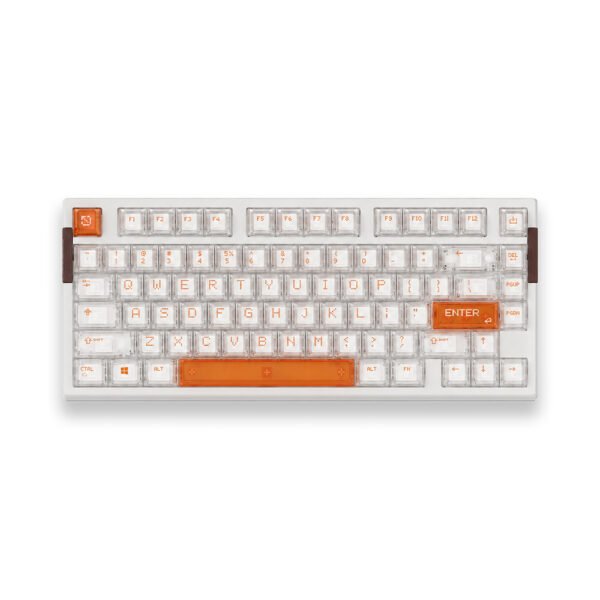
Weikav's own description positions it as a successor to the AIR68 HE, built around a newer chip for rapid trigger precision and scan rate. If you want the magnetic feature set without giving up the build quality of an aluminum gasket-mounted board, this is the most obvious candidate in the catalog.
2. Best-documented 75%: Wooting 80HE
Wooting is the name most associated with this category, and the 80HE is its 75% entry at 84 keys.
The DB lists a gasket-mounted polycarbonate plate, PCR ABS or zinc alloy case (65% post-consumer recycled), Lekker L60 V2 switches with a 0.1–4.0 mm adjustable actuation point, rapid trigger, 8K polling, north-facing per-key RGB, and screw-in PCB stabilizers. Dimensions are 346 × 142 × 38 mm at 790 g, with OEM-profile PBT keycaps.
Configuration runs entirely through Wootility, with settings stored onboard — so your actuation profile follows the keyboard to another machine. The recycled-plastic case is a genuine differentiator if that matters to you, though it means giving up the metal build of the EG75 HE.
The newer 80HE+ (FR4 plate, Lekker Tikken switches) is also listed on KeyLab DB. Availability shifts over time, so compare both pages before you buy.
3. The 60% reference point: Wooting 60HE V2
The 60HE is the board that made this category mainstream, and the V2 listing keeps the formula: 61 keys, 0.1–4 mm adjustable actuation, rapid trigger, 8 kHz polling, and an FR4 plate with a screwless friction-fit PCB mount.
You choose between an aluminum or ABS case (the ABS version carries an internal aluminum plate), and it ships with 1.5 mm double-shot OEM PBT keycaps. At 305 × 115 × 38 mm and 606 g, it is by far the lightest board here — a deliberate choice for players who reposition the keyboard constantly.
If you want a 60% and want the most-documented implementation of magnetic switches available, this is the safe answer.
4. Best for customization: Keychron Q2 HE 8K
Most magnetic keyboards lock you into vendor software. The Q2 HE 8K is the exception worth knowing about: the DB lists it with QMK/VIA support alongside the magnetic feature set.
It is a 65% aluminum board with an aluminum plate and gasket mount, at 327.53 × 121 × 43.48 mm and 1650 g — the second-heaviest board in this roundup. Keycaps are OSA-profile PBT, and switch compatibility is listed as Keychron Lime and Gateron Jade magnetic switches, hot-swappable between them.
The trade-off is that magnetic-specific settings still run through Keychron Launcher rather than plain VIA. But if you already have a QMK/VIA workflow and do not want to abandon it for a proprietary configurator, this is the path of least resistance.
5. Thinnest build: IQUNIX EV63
The EV63 takes a different angle: a 60% board with 64 keys in an aluminum case with an aluminum plate and gasket mount, finished with forged carbon fiber.
The number that stands out is height. At 300.9 × 126 × 18.6 mm, it is less than half as tall as the other standard-profile boards here, while still weighing 1206 g. That density-to-thickness ratio is unusual and means a much shallower wrist angle without a wrist rest. Keycaps are listed as PBT/PC, and it is hot-swappable.

Note that the DB lists no RGB and a wired-only connection. This is a board aimed at people who want a solid, understated object rather than a lit-up gaming centerpiece.
6. Best TKL option: Pulsar PCMK 2 HE TKL
If you need function keys and arrows, the PCMK 2 HE TKL is the most completely specified TKL in the magnetic section of the catalog.
The listing covers an aluminum case and aluminum plate, 87 keys, 0.1–4.0 mm adjustable actuation, rapid trigger, 8000 Hz polling at 0.125 ms latency, three-stage sound dampening foam with silicone case lining, and dye-sub double-shot PBT keycaps. It measures 355 × 127 × 37 mm at 970 g.
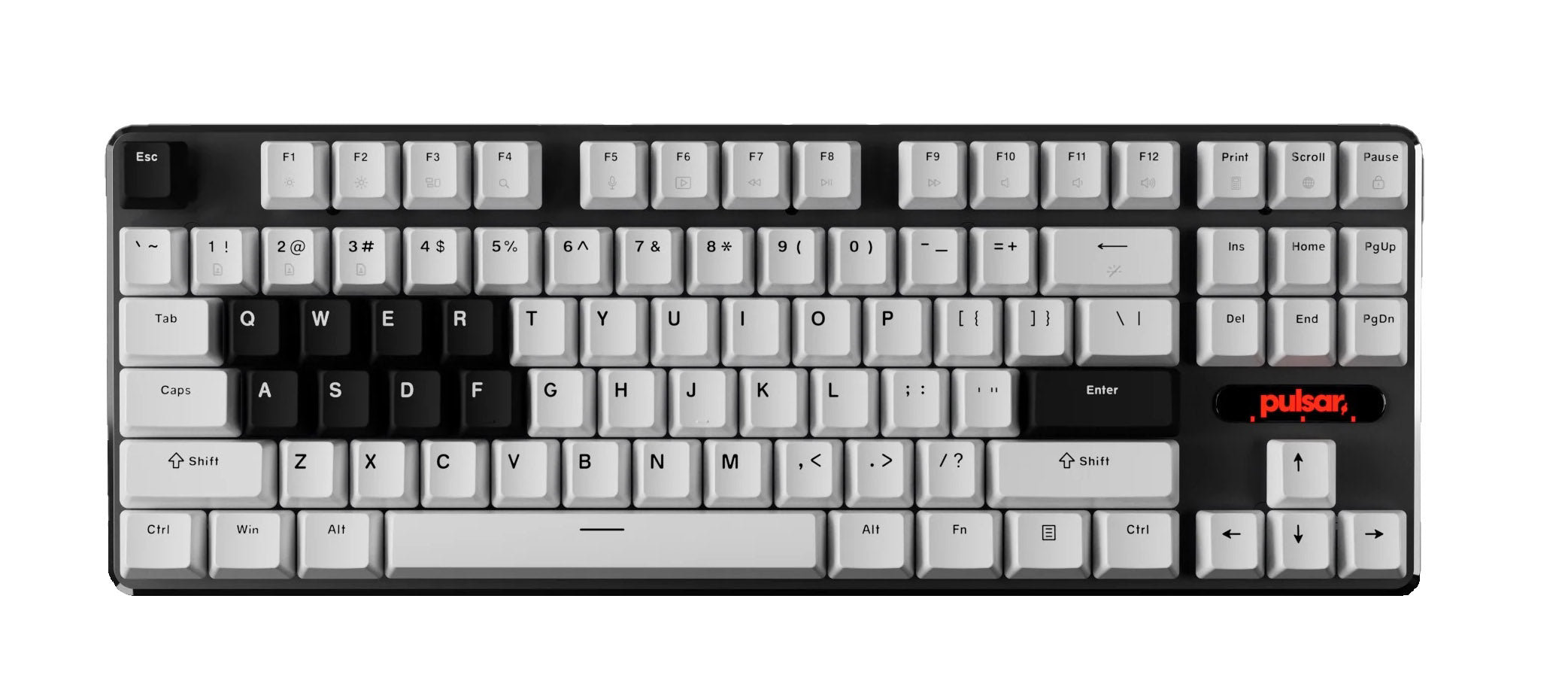
Two details are worth singling out. The hot-swap PCB accepts both north- and south-facing switches, which is rare and widens your switch options considerably. And the inclusion of a proper foam stack suggests Pulsar cared about sound, which most boards in this category do not bother with. Configuration is through Pulsar's web-based tool, so there is nothing to install.
Boards We Looked at but Ranked Lower
Several magnetic boards in the catalog are interesting but harder to recommend as a first purchase. MelGeek's Centauri 60/80 and the MADE68 Ultra V2 both offer aluminum gasket-mounted builds and unusual features — an OLED touchscreen on the Centauri, a multi-MCU architecture on both — but the DB lists them as not hot-swappable, which means committing permanently to the bundled switches. For a category where switch choice is most of the experience, that is a significant constraint.
When Not to Buy Magnetic
Be honest about what you are buying for.
If you mostly type, the case for magnetic switches is weak. The adjustable actuation point does not help you write, rapid trigger does nothing for prose, and the switch selection is dominated by linears optimized for speed rather than feel. You will also give up a great deal of tuning latitude — the switches must be magnetic, so all the usual experimentation with different springs and stems narrows to whatever your board supports. If sound and feel are what you want, our roundup of keyboards built for a thocky sound is a better starting point.
If you play competitively, the calculation flips. Rapid trigger genuinely changes how counter-strafing and fast directional changes feel, and that is not a placebo.
Finding More
The full magnetic catalog is at the magnetic keyboard filter on KeyLab DB, with more than 160 boards and live specifications.
On the switch side, the Hall effect switch filter covers more than 70 magnetic switches. Note that sensing method is tracked separately from feel and size, so you can combine it with linear/tactile and standard/low-profile filters. Our guide pages explain how those axes fit together.